
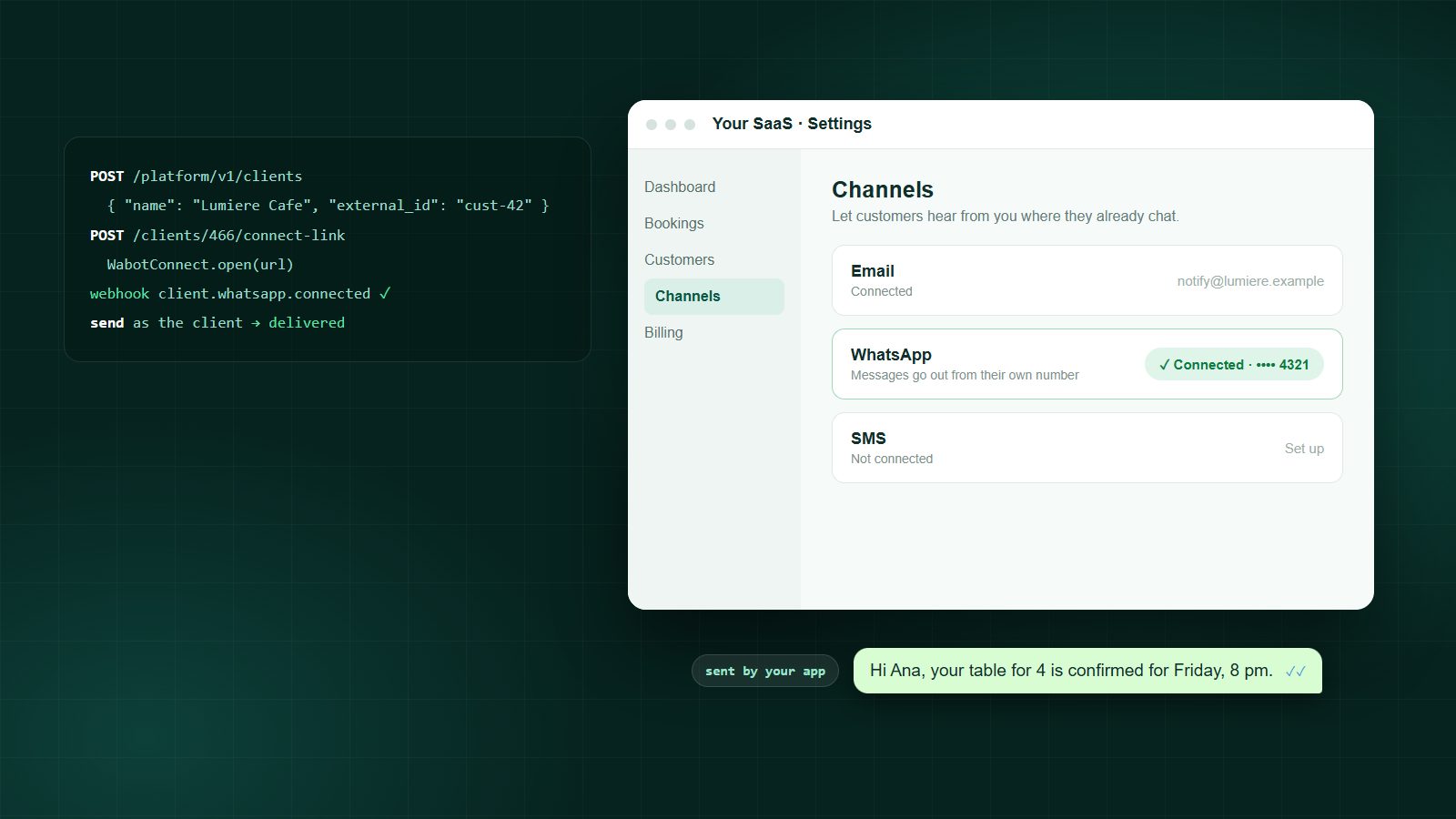
Three steps from your code to a connected number
No Meta app to build, no App Review to pass. Your server talks to one API, and your customer clicks one button.
Create a client for each customer
One call from your server. Pass your own customer id as external_id so you can find them later.
curl -X POST https://app.wabot.shop/platform/v1/clients \
  -H "Authorization: Bearer $WABOT_PLATFORM_KEY" \
  -H "Content-Type: application/json" \
  -d '{ "name": "Lumiere Cafe", "country": "Brazil",
"external_id": "cust-42" }'Open the connect pop-up from your page
Your customer clicks your own button, logs in with Facebook and picks their number. They never need a Wabot login.
<script src="https://app.wabot.shop/sdk/wabot-connect.js"></script>

connectButton.addEventListener("click", () => {
  WabotConnect.open(
    () => fetch("/api/whatsapp/connect-link", { method: "POST" })
            .then((r) => r.json()).then((d) => d.url),
    { onConnected: ({ numbers }) => showConnected(numbers) },
  );
});Get a signed webhook, then send
Wabot tells your server the moment the number connects. Fetch that customer’s API credentials and send messages as them.
// POST to your endpoint, signed with X-Wabot-Signature
{
  "type": "client.whatsapp.connected",
  "data": {
    "client": { "id": 466, "external_id": "cust-42" },
    "numbers": [{ "phone_number": "+55 11 98765-4321" }]
  }
}
What happens behind your button
Your product stays in front. Wabot runs Meta’s signup for your customer and reports back to your server.
From your button to a connected number
What you get
Everything a multi-tenant product needs to offer WhatsApp, without becoming a Meta partner yourself.
Platform API
Create clients, make connect links, read each customer’s status and fetch their messaging credentials. Bearer keys, 120 requests a minute per key.
Connect pop-up
One script tag. Meta’s signup runs in a pop-up opened from your own page, and your page hears back when it’s done.
Signed webhooks
client.ready, client.connect_link.opened and client.whatsapp.connected, each signed with HMAC-SHA256 and retried if your server is down.
Messaging per customer
Every customer account has its own API credentials: template and session messages, templates, contacts and conversations.
Clients dashboard
See every customer in one list with your own IDs: connected or not, plan, wallet, messages sent and what needs attention.
Their number, their Meta bill
Each customer owns their WhatsApp Business Account. Meta bills message charges to their own payment method, with no markup from Wabot.
Your customers in the Clients list, with your own IDs
Ready to try it with your first customer?
Make a key, create a test client and open the pop-up from your own page.
Become a Tech Provider, or build on one
You can go to Meta directly. Here is what that involves, next to building on Wabot, which is already a Meta Tech Provider.
| Do it yourself with Meta | Build on Wabot | |
|---|---|---|
| Meta business verification | Yours to complete | Already done by Wabot |
| Meta App Review | Record and submit two flows, wait for approval | Not needed |
| Onboarding cap | 10 new customers per 7 days at first, 200 after more checks | Ask us what applies to your volume |
| Embedded Signup code | Build the front end, exchange codes, register numbers, subscribe webhooks | One script tag and one API call |
| Keeping up with Meta’s versions | Yours: Graph API and signup versions change | Handled by Wabot |
| Who pays Meta for messages | Each customer, on their own payment method | Each customer, on their own payment method |
| Branding in Meta’s window | Your app’s name | The Wabot name |
Built for products like yours
If your customers talk to their own customers, WhatsApp belongs inside your product.
Booking and appointment software
Each salon, clinic or restaurant sends confirmations and reminders from its own number.
Your table for 4 is confirmed for Friday, 8 pm. ✓✓CRMs and helpdesks
Your users reply to WhatsApp chats without leaving the tool they already work in.
Thanks, Priya. Your ticket #2291 is with our team. ✓✓E-commerce and order platforms
Every store sends order and delivery updates under its own business name.
Your order has shipped. It arrives on Tuesday. ✓✓School, clinic and membership software
Fee reminders, class changes and renewals reach people where they read them.
Reminder: the term fee is due on 30 November. ✓✓Example messages are illustrations.
Frequently asked questions
Who owns the WhatsApp number and account?
Your customer does. They connect through Meta’s own signup, so the WhatsApp Business Account and the number belong to their business, and they can see both in Meta’s WhatsApp Manager.
Who pays Meta for messages?
Your customer, on their own payment method in their Meta account. Wabot is a Meta Tech Provider and adds no markup to Meta’s message charges.
What does my customer see when they connect?
A pop-up opened from your page: a short Wabot connect page, then Meta’s signup window, which shows the Wabot name. They need a Facebook login and a business in Meta, which they can create in the window. They don’t need a Wabot login.
Can my customers keep using the WhatsApp Business app?
Yes. On the connect page they can choose to keep their WhatsApp Business app on the same number, or use a new number.
What does it cost?
Creating your account and API key is free. Each customer account starts on the Free plan, and Wabot’s paid plans start at $9 a month per account. Meta’s message charges are separate and go to your customer. Message us for volume pricing.
What are the limits?
120 API requests a minute per key, up to 10 customers waiting to connect at a time, up to 100 new customers a day, five API keys and three webhook endpoints. A connect link works for up to 7 days.
How do I keep it secure?
Your platform key stays on your server and never goes into a browser. The pop-up script holds no key, and every webhook carries a signature you check with your endpoint’s secret.
Is this white label?
No. Your customers see your product around the pop-up, and the Wabot name on the connect page and in Meta’s window.
Get your API key
Create your account, switch on the software option under Account type, then open Clients and make a key in the Developer window.
Get your API key
Create your free Wabot account. Then choose the software option under Account type and make your first platform API key. No card needed.