A WhatsApp AI agent is only as good as what you teach it and how you set it up. When it gives a vague answer or says it doesn’t know, the fix is almost always in your information, not in the AI.
These 15 tips come from setting up Wabot’s AI agent for real businesses. They’re in three groups: what to teach it, how to set it up, and how to test and improve it. New to AI agents? Start with what a WhatsApp AI agent does.
First, how the agent picks an answer
When a customer writes, the agent looks through your information for the entries closest in meaning to the question. It then writes a short answer using only those entries. If nothing fits, it sends your fallback message instead of guessing.
So two things decide the quality of every answer: whether the answer is in your information, and whether it’s written clearly enough to be found. Most of the tips below are about those two things.
Part 1: Teach it the right things
1. Start with the questions you get most
Scroll through your WhatsApp chats and note the ten questions that come up again and again. Teach those first. On the Teach your bot page, the Covered so far list shows which common topics you’ve covered: about the business, prices, delivery and returns, opening hours and contact, and FAQs. Tap a missing one to add it.
2. One topic per entry
Make separate entries for delivery, returns and opening hours. One long entry about everything is harder to match to a question. With Write it yourself, pick the type that fits: question and answer, prices, policy, opening hours, or something else.
3. Write it like you’d explain it to a new staff member
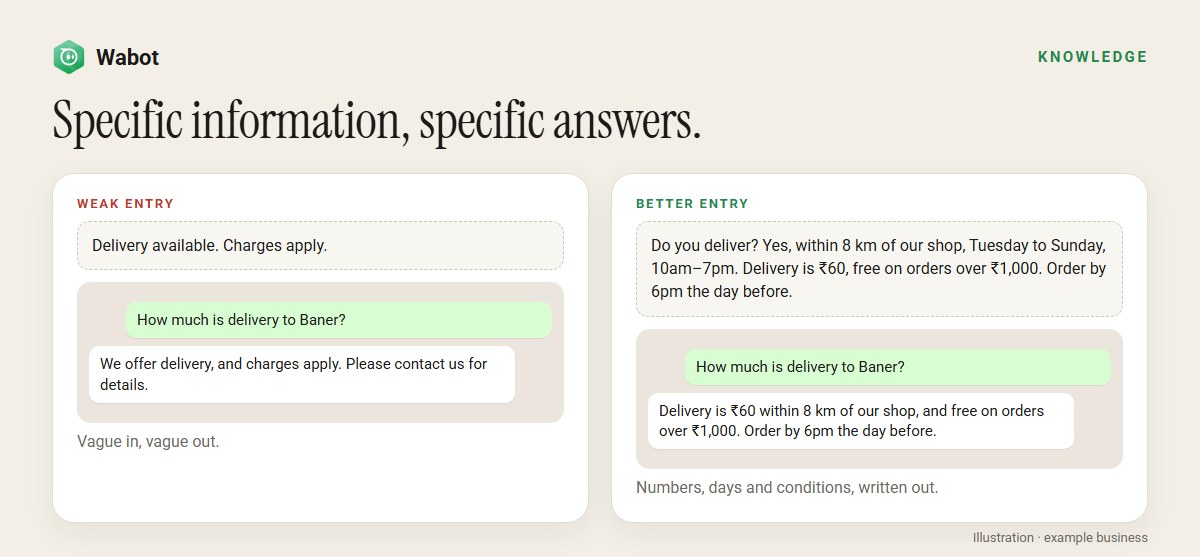
Spell out the numbers, days, places and conditions. Delivery costs ₹60 within 8 km, free over ₹1,000 gets a precise answer. Charges apply gets a vague one. The agent won’t fill in the gaps for you, and that’s a good thing.
4. Use your customers’ words, and make each entry stand alone
If customers say home delivery, shipping and courier, use those words. Avoid see above or as mentioned: the agent may read one entry without the others.
5. Keep one version of each fact
When a price changes, edit the entry instead of adding a new one. Two entries with different prices confuse the agent. Remove old website pages, such as last season’s offers, for the same reason.
6. Type your key facts instead of relying only on your website
From your website reads one page at a time, or the pages you pick from your sitemap. That’s useful, but web pages are often long, mixed with other content, or out of date, and some sites load their text in a way the agent can’t see. For prices, hours and policies, Write it yourself gives the most reliable answers. When a page changes, use Re-read on it.
7. Selling online? Sync your store
Product questions, such as Do you have this in size M?, are answered from the products you sync From your store (Shopify or Wix), and only products in stock are offered. Keep writing your delivery and returns policies yourself. Our WhatsApp store guide covers the rest of the shop setup.
Part 2: Set up the bot well
8. Fill in your bot’s identity
On Teach your bot, set up Your bot’s identity: a bot name, your business name and a tone. Add a line or two under Anything else it should always know, such as Family-run since 1998. All our cakes are eggless. Keep longer topics in separate entries.
9. Write short instructions that cover five things
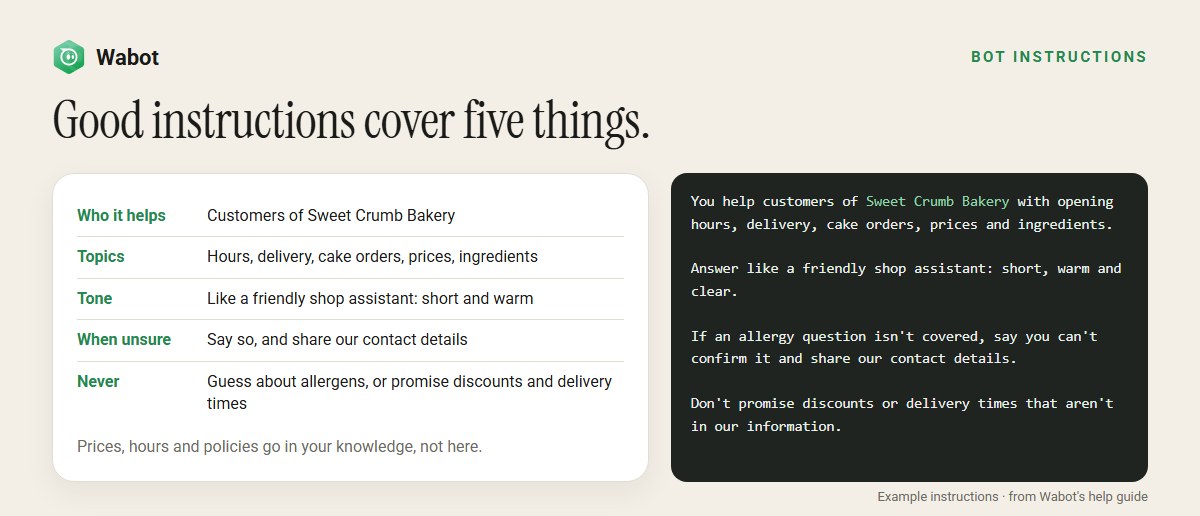
In the bot’s Instructions, say who it helps, which topics it covers, how it should sound, what to do when it isn’t sure, and what it must never promise. Keep facts such as prices out of the instructions: they belong in your knowledge. Don’t ask for long answers, tables, bookings or another language. The agent keeps answers short and plain, and it can’t book or take payments itself.
10. Write an honest fallback message
The fallback message is what customers get when the answer isn’t in your information. Make it useful: who to contact, how, and when. For example: Sorry, I don’t have that information. Please call us on 98765 43210, Monday to Saturday from 9am to 6pm, and our team will help. It’s sent exactly as you write it, so you can write it in your customers’ languages. Only promise what your team will really do.
11. Don’t force it to always answer
Instructions such as never say you don’t know or always give a price push the AI to guess. Tell it what to do when it isn’t sure instead, such as sharing your contact details.
12. Match the tone and the role
The bot’s Behaviour sets its tone and its Department sets its role. Keep them in line with your instructions: a Friendly bot with instructions to be formal gets mixed signals. A clinic suits Empathetic. A shop helping people choose suits Sales.
13. Give each bot only the information it needs
If you have several numbers or services, use the bot’s Data Configuration to pick its documents, so the dental bot never quotes physiotherapy prices. Use Select All if you want documents you add later to be included too. Ticked documents alone don’t include new ones.
14. Attach files and links, with clear timing
You can attach a menu PDF, a photo, a link button or reply buttons to an entry. Always fill in When to send this attachment, for example When the customer asks for the menu, or it never goes out. The agent doesn’t read attachments, so type the important facts into the entry too.
Put these tips to work on your own number
Create your free Wabot account, teach your bot your top questions and try it before customers see it. No card needed.
Part 3: Test it, then keep improving
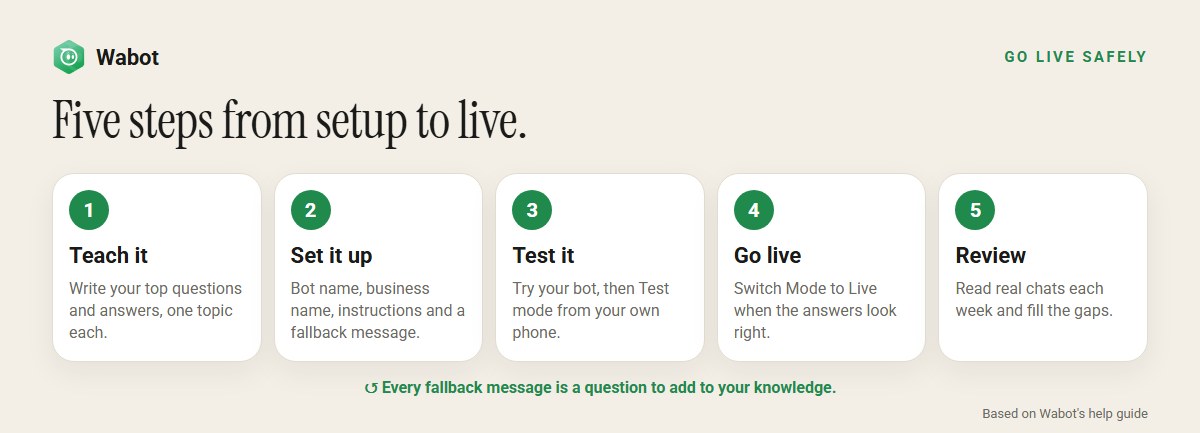
15. Test with hard questions, then review real chats
Use Try your bot for quick checks. It answers each question on its own, without memory of the previous one. Then put the bot in Test mode with your number under Test Phone Numbers, starting with + and the country code, and message your business from your phone. Try:
- the ten questions customers ask most;
- a question in two parts, such as Do you deliver to Kothrud, and how much is it?;
- a follow-up, such as And on Sundays?;
- something you don’t offer, to check the fallback message;
- a complaint, to check the tone.
When the answers look right, set Mode to Live. For the first weeks, read a few real chats each week: AI replies are marked AI agent in the inbox. Every time a customer gets your fallback message, you’ve found a question to add.
Good to know
- Bookings work best with a workflow. The agent can share your booking link, but it can’t book by itself. A booking workflow that replies to words like book or appointment handles those requests reliably.
- Your team can take over any chat. Assigning a chat to a teammate in the shared inbox switches the AI off for that chat. Turn the AI switch back on when you’re done.
- Memory is short. The agent remembers the last 10 messages from the last 24 hours. A customer who returns days later starts fresh.
- Replies are in English by default. Ask Wabot’s support team to set another reply language for your number.
- Keep your wallet topped up, or use your own AI key. With an empty wallet and no key, the agent stops replying. If it fails to reply, you’ll see an alert under the bell icon.
Each screen and field is described in Wabot’s help guides: teach your bot, AI bot settings and get accurate answers.
Frequently asked questions
Why does my WhatsApp AI agent say it doesn’t have the information?
Because the answer isn’t in what you’ve taught it, or it’s written too vaguely to match the question. Add an entry for that question, with the details written out, then ask again in Try your bot.
Should I paste my prices into the bot’s instructions?
No. Instructions are for how the bot behaves. Prices, hours and policies belong in your knowledge, where the bot looks for answers. Keep each fact in one place so it’s easy to update.
Is adding my website enough?
It’s a good start, but typed entries give the most reliable answers. A website page can be long, mixed and out of date. Type your key facts with Write it yourself, and add only the website pages customers really ask about.
How often should I update the AI agent?
Whenever a price, timing or policy changes, edit the entry the same day. For the first weeks, also read a few real chats each week and add any question the agent couldn’t answer.
Can I make the AI agent reply in my customers’ language?
Replies are in English by default, and instructions alone don’t change that. Ask Wabot’s support team to set your number’s reply language. Your fallback message is sent exactly as you write it, in any language.
The short version
Teach the agent clearly, one topic at a time, with the details written out. Give it short instructions and an honest fallback message, and keep facts in your knowledge, not in the instructions.
Then test it with hard questions, go live, and turn every fallback message into a new entry. A few minutes a week keeps the answers accurate as your business changes.
Build a WhatsApp AI agent that gives good answers
Free account, no card needed. Teach your bot, test it from your own phone, then go live.