Your reel of a Munnar sunrise does well. By the evening there are 60 comments: “price?”, “PRICE pls”, “details 🙏”. You reply to the first ten. The rest wait until tomorrow, and by then most of them have moved on to the next travel page in their feed.
Comments are the warmest leads you get on Instagram, but replying to each one by hand doesn’t scale. This post shows how to auto-reply to Instagram comments with WaBot, move the interested people into a DM, and hand them to your team. It also explains plainly what WaBot can’t do here today.
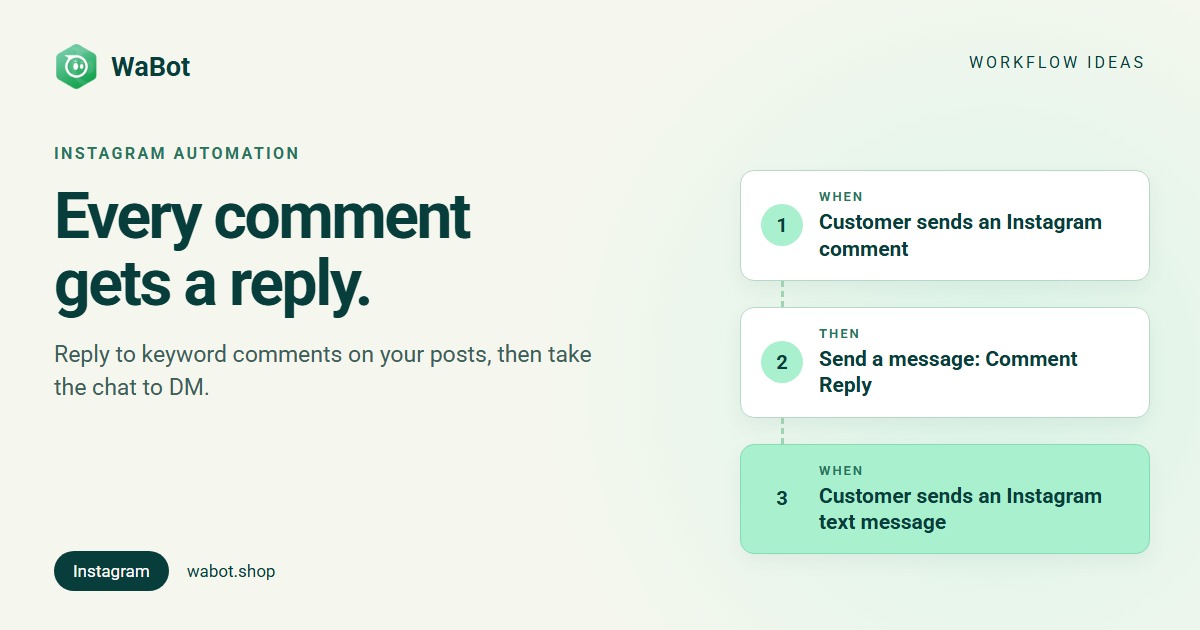
Comment “PRICE” → public reply → DM → your team
What this workflow does
- Replies publicly to every comment on your posts that contains your keyword, such as PRICE, within seconds.
- Asks the commenter to DM you a second keyword (for example KERALA), so the conversation moves into Instagram Direct.
- Answers that DM straight away with your packages or prices, with tap-to-choose quick replies.
- Assigns the chat to a teammate in the shared inbox, so a person continues from there.
First, the honest part: can WaBot DM everyone who comments?
Not today. In WaBot, a workflow started by an Instagram comment can send a Comment Reply, which is a public reply under that comment. It doesn’t send a private DM to the commenter on its own. The private conversation starts when the commenter messages you, and from then on your workflows and team can reply in Direct.
That’s why this workflow uses two keywords: one in the comment, one in the DM. It costs the customer one extra tap, but it also means everyone you message has chosen to talk to you.
Why it works
- Speed. A reply that lands while the person is still scrolling your post gets read. A reply the next morning usually doesn’t.
- Public replies sell to everyone else too. Other people reading the comments see that you answer, and that the details are one DM away.
- The DM is where you can actually help. In Direct you can send options, ask dates and group size, and share photos without crowding your comments.
- A person still closes the sale. The workflow does the first two replies; your team does the selling.
Before you start
- Connect Instagram under Settings → Meta Platforms → Instagram. Choose Connect Instagram with Facebook if your Instagram Business account is linked to a Facebook Page, or Connect Instagram to log in with Instagram only (no Facebook account needed). See Connect WhatsApp, Instagram & Messenger.
- Workflows are on the Base Plan (₹9,240/year + GST). The Starter plan (₹840/month + GST) has the shared inbox and campaigns but not workflows. You can sign up free and connect your accounts first.
Build it in WaBot, step by step
Step 1: reply to the comment
- In the left menu, open Workflows and click Add workflow. Name it, e.g. Instagram comment to DM. Under How should it run? choose Automatic, start from Blank, and pick the form or flowchart editor.
- Click Choose a trigger and pick Customer sends a message.
- Fill in the sentence under When does it run?: When a customer sends a Instagram Comment message that contains PRICE. Leave the text empty if you want to reply to every comment.
- Under Instagram is connected through, choose the same option you used when linking the account: Instagram login or Facebook Page.
- Click Choose an action → Send a message. Set Message type to Comment Reply and write your reply. (Comment Reply only shows up when the trigger is a comment.)
Matching is case-sensitive, so “PRICE” and “price” are different. Ask for the keyword in capitals in your caption (“Comment PRICE”), or open Advanced → Conditions and add a second condition group for the lowercase spelling, joined with OR.
Step 2: answer the DM
- Add a second step (in the flowchart: click + under the last action and choose New step, or add a trigger block). Trigger: Customer sends a message, sentence: Instagram Text message that contains KERALA.
- Action: Send a message with Message type Quick Reply (or Text only). List your packages and add a quick reply for each one.
- Action: Add to groups or tags, e.g. tag Instagram lead, so you can find these people later.
- Action: Assign to team member. Choose Round-robin or Least busy and pick your teammates. Leave Only if the chat isn’t assigned yet on.
Step 3: test and switch on
- Click Save and clear anything listed in the Set up panel at the top.
- Turn on both switches: Step on at the top of each step, and the switch on the workflow’s card.
- From a personal Instagram account, comment PRICE on one of your posts, then DM the keyword. Check the reply under the comment, the DM and the assignment in the inbox.
The Workflows guide covers every trigger and action in more detail.
Build this Instagram comment workflow in WaBot.
Messages you can copy
Public reply to the comment (keep it short; other people will read it too):
Thanks for asking! 🙌 DM us the word KERALA and we'll send the full itinerary and price.
Hi! Prices depend on dates and group size. Send us a DM with KERALA and we'll share the options 😊
First DM after they message you:
Hi! 🌴 Here are our Kerala trips:
• Munnar 3N/4D
• Alleppey houseboat 2N
• Wayanad 3N/4D
Tap one, and tell us your dates and how many people are travelling.
Thanks for messaging! A travel consultant will reply here shortly. Meanwhile, which month are you planning to travel?
Instagram has no message templates. You can reply to a DM for 7 days after the customer’s last message (in the first 24 hours as normal, after that as a human-agent reply). Replies to comments are public, so that window doesn’t apply to them. If you also message customers on WhatsApp, anything sent outside WhatsApp’s 24-hour window must be a Meta-approved template, and marketing messages only go to customers who agreed to hear from you.
Variations and tips
- One keyword per post. Use a different comment keyword for each offer (HOUSEBOAT, WAYANAD) and a matching step, so each DM gets the right details.
- Move the chat to WhatsApp. In the DM, ask for their WhatsApp number or share your WhatsApp link, so you can send quotes, payment links and reminders there. See WhatsApp for travel agencies in Kerala.
- Let AI answer the DM. Instead of a fixed reply, add Hand off to an AI bot in step 2 so a bot trained on your packages answers follow-up questions. AI replies are pay-as-you-go from your WaBot wallet.
- Running ads? Click-to-message ads are a better fit than comments for paid traffic. See our Click-to-WhatsApp ads guide.
Turn every comment into a conversation.
Frequently asked questions
Can WaBot send a private DM to everyone who comments on my Instagram post?
Not today. A workflow started by a comment can reply publicly under that comment. The DM conversation starts when the commenter messages you, which is why this workflow asks them to DM a keyword.
Do I need an Instagram Business account?
You connect Instagram in Settings → Meta Platforms → Instagram, either with Facebook (for an Instagram Business account linked to a Facebook Page) or with an Instagram login only.
Can it reply only to comments with a certain word?
Yes. In the trigger sentence choose Instagram, Comment, contains, and type the word. Matching is case-sensitive, so add a second condition for other spellings.
Which plan do I need?
Workflows are on the Base Plan (₹9,240/year + GST). The Starter plan has the shared inbox and campaigns but not workflows.
Final thoughts
Comments are people raising their hand. A quick public reply keeps them interested, and a keyword DM brings the serious ones into a private chat your team can work with.
Set up the comment reply first, test it on one post, then add the DM step and the team assignment.