It’s November. Your Munnar and houseboat posts are working, and WhatsApp fills up with “Munnar package for 4?”, “Alleppey houseboat 25 Dec available?”, “Wayanad 3 days rate?”. Your consultants are on calls. Half the enquiries get a reply after two hours, and some never get one.
In peak season, the agency that replies first with clear options usually gets the booking. This post shows a WaBot workflow that auto-replies to travel enquiries on WhatsApp with your packages, follows up the next day with people who went quiet, and hands interested travellers to a consultant.
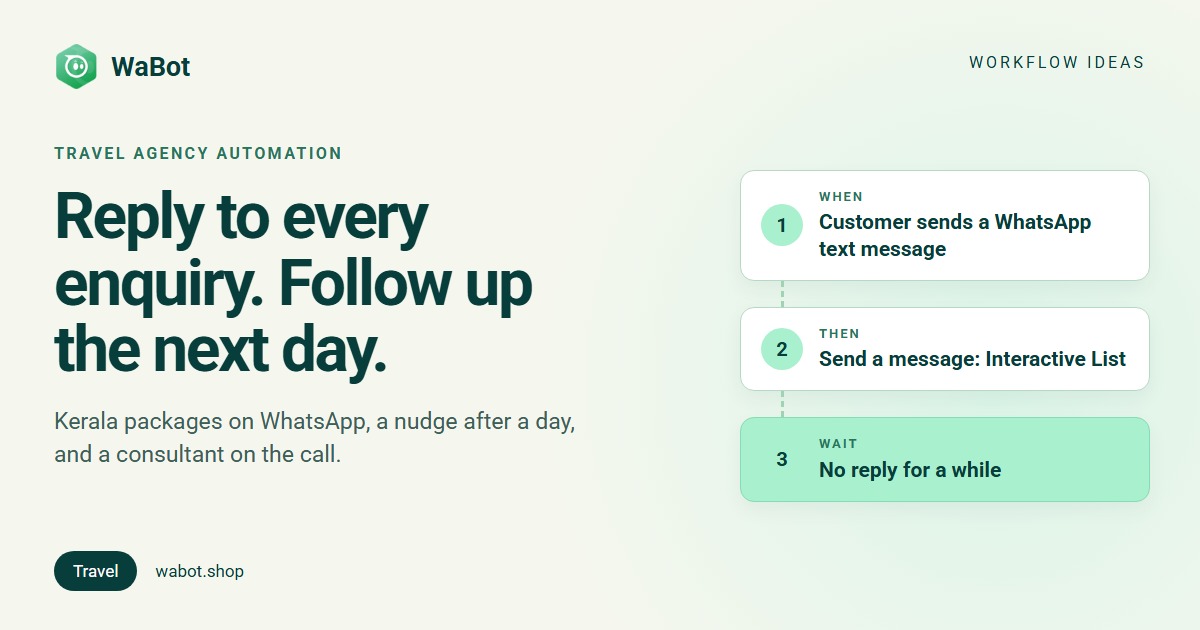
Enquiry → packages → next-day nudge → consultant
What this workflow does
- Replies within seconds to any WhatsApp message that mentions your destinations (Munnar, Alleppey, Wayanad, Kerala), with a tap-to-choose list of packages.
- Tags the contact as a Kerala enquiry, so you can find and count them later.
- If the customer picks a package, assigns the chat to a consultant straight away.
- If the customer goes quiet for a day, sends one approved follow-up template with a “Yes, call me” button.
- When they tap it, assigns the chat to a consultant and creates a follow-up task to call them.
Why it works
- Travellers ask several agencies at once. A clear reply in the first minutes keeps you on their shortlist.
- A list beats a wall of text. Package names in a WhatsApp list are easy to read on a phone and one tap to answer.
- People go quiet for ordinary reasons: they’re waiting for family to agree on dates or comparing prices. One reminder a day later often restarts the chat.
- Consultants get warm leads. By the time a person picks up the chat, the customer has chosen a package or asked for a call.
- Season pressure. November to February is Kerala’s busy season, and Christmas and New Year dates for houseboats and hill resorts go early. Fast replies matter most exactly when your team is busiest.
Build it in WaBot, step by step
Workflows are on the Base Plan (₹9,240/year + GST); Starter (₹840/month + GST) has the shared inbox and campaigns but not workflows. The steps below use the flowchart editor, because it shows how steps connect. Each next step line means “only for contacts who finished the earlier step”.
Step 1: reply to the enquiry
- Open Workflows in the left menu and click Add workflow. Name it Kerala enquiries, choose Automatic, start from Blank and build with the Flowchart editor.
- Add a trigger: Customer sends a message, sentence WhatsApp Text message that contains Munnar.
- For more destinations, open Advanced → Conditions and add one condition group per keyword (Message Content contains Alleppey, …contains Wayanad, …contains Kerala), joined with OR. Matching is case-sensitive, so add lowercase spellings too, such as “munnar”.
- Action: Send a message → Message type Interactive List. Add one row per package (Munnar 3N/4D, Alleppey houseboat 2N, Wayanad 3N/4D, Munnar + Alleppey 5N).
- Action: Add to groups or tags → tag Kerala enquiry.
Step 2: package chosen → consultant
- Click + under the last action and choose New step. Trigger: Customer sends a message, WhatsApp Interactive list message (leave the title empty to catch any package).
- Action: Send a message: “Great choice! A consultant will message you shortly with dates and the final price.”
- Action: Assign to team member → Round-robin between your consultants, with Only if the chat isn’t assigned yet on.
Step 3: nudge after a day of silence
- Add another New step under step 1. Trigger: No reply for a while.
- Start when: The customer hasn’t replied. After no reply for: 1, unit days. (Anything from 5 minutes to 30 days works.)
- Action: Send a template, Send to The customer. Pick your approved nudge template with two quick reply buttons, “Yes, call me” and “Not now”. After 24 hours without a reply WhatsApp only allows templates, so this must be one.
Step 4: “Yes, call me” → consultant
- Add a New step under step 3. Trigger: Customer sends a message, WhatsApp Interactive quick reply buttons where the title is exactly Yes, call me.
- Action: Assign to team member (round-robin).
- Action: Create follow-up: “Call {{senderName}} about their Kerala trip”, due in 2 hours, for The chat’s assignee.
Step 5: test and switch on
- Click Save and work through the Set up panel.
- Select the step 1 trigger block and click its send icon (Send a test) to see the list on your own WhatsApp.
- Turn on Step on for each step and the switch on the workflow card. Then message the business number from another phone with “Munnar package?” to test the real flow.
More on triggers, conditions and next steps in the Workflows guide.
Build this travel enquiry workflow in WaBot.
Messages you can copy
First reply (list message body; sent straight after their message, so no template needed):
Thanks for your enquiry! 🌴 Kerala is beautiful from November to February. Tap “View packages” to see our trips, and tell us your dates and number of travellers.
Next-day nudge (submit as a template; buttons “Yes, call me” and “Not now”):
Hi {{1}}, still planning your Kerala trip? Christmas and New Year dates for houseboats and Munnar stays book early. Shall a travel consultant call you with options?
After they tap “Yes, call me”:
Thank you! A travel consultant will call you within 2 hours. If you prefer a time, just reply here.
Anything sent outside the 24-hour window, like the next-day nudge, must be a Meta-approved template. Promotional messages and offers only go to customers who agreed to hear from you. For more wording ideas, see WhatsApp message templates for travel agents.
Variations and tips
- Same text every time. Case-sensitive matching is easier when the first message is predictable. Use a WhatsApp link with a pre-filled message, like “Kerala packages”, on your website, Instagram bio and ads.
- The nudge runs once per silence. It fires once when a contact from step 1 goes quiet for a day, and not again until they write back. If they write back and later go quiet again, they can get it again, so keep the wording general and switch the step off if your consultants prefer to follow up by hand.
- Track bookings. If you use Pipelines, add a Create deal action in step 2 so every chosen package becomes a card on your bookings board.
- After the trip, ask for a review the same way: see Ask for Google reviews on WhatsApp.
- The bigger picture for agencies is in WhatsApp for travel agencies in Kerala, and for resorts and homestays in WhatsApp for hotels and homestays.
Reply to every Kerala enquiry this season, even at midnight.
Frequently asked questions
Can WhatsApp auto-reply with different packages for different destinations?
Yes. Make one step per destination keyword (Munnar, Alleppey, Wayanad), each sending its own list or template. Matching is case-sensitive, so add the lowercase spelling as an OR condition.
How does the next-day follow-up know the customer didn’t reply?
The No reply for a while trigger with “The customer hasn’t replied” waits the time you set after your last message. If the customer writes in the meantime, it doesn’t run.
Why does the follow-up have to be a template?
WhatsApp only allows free-form messages for 24 hours after the customer’s last message. A next-day nudge falls outside that window, so it must be a Meta-approved template.
Which WaBot plan includes this?
Workflows are on the Base Plan (₹9,240/year + GST). Meta’s message charges are billed by Meta directly.
Final thoughts
In peak season you can’t answer every enquiry by hand in the first five minutes, but a workflow can. Send your packages instantly, nudge once after a day, and let your consultants spend their time on people who want a call.
Set it up before the Christmas rush, test it with a colleague’s phone, and adjust the package list as dates fill up.