You’ve got a free “how to crack prelims” series, a 7-day skincare routine, or a mini-course that sells the real one. People sign up with enthusiasm. Send everything at once and they’ve forgotten you by tomorrow; plan to send one message a day by hand and you stop on day 3.
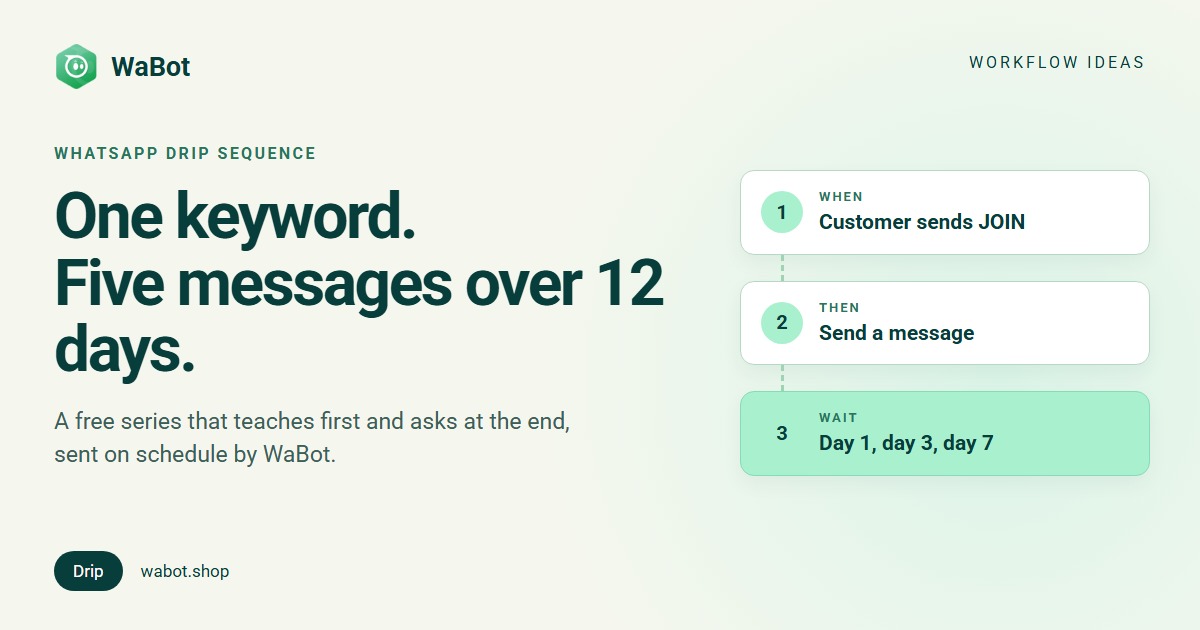
A WhatsApp drip campaign automation sends the series for you. The customer sends one keyword, and five messages go out over 12 days, each at the time you set. The last one asks whether they’d like a call, and that tap lands with your counsellor. This post builds it in WaBot for a coaching institute; D2C brands and course sellers change the messages, not the workflow.
JOIN → 5 messages over 12 days → “Call me”
What this workflow does
- Starts when a customer sends JOIN, from a QR code, a wa.me link, your website or an Instagram bio.
- Sends a welcome at once, then approved templates on day 1, day 3, day 7 and day 12. All five are queued the moment the customer joins, each with its own wait.
- Tags the contact Prep series.
- Day 12’s message has two buttons. Call me assigns the chat round-robin to a counsellor, marks the contact as a lead and creates a call task due in an hour. Not now tags them and sends a polite close.
- Queued messages keep going even if the customer replies in between, so the series is short and each message stands on its own.
Why it works
Spacing beats dumping. Five messages over 12 days give someone five small reasons to open your chat, and the gap between them is where they actually try the advice. A single long message gets skimmed once.
The keyword is clear permission: nobody is on this list by accident. And the order is value first, ask last. Days 1 to 7 teach; day 12 makes one offer with one tap. By then the customer knows what your teaching is like, so the “Call me” tap is a warm lead, and your counsellor gets it with a task attached.
Build this 12-day drip sequence in Wabot, free
Create your free account here. Connect your WhatsApp number and you get 15 days of the Base Plan, workflows included, no card needed.
Before you start
- Four approved marketing templates (day 1, 3, 7 and 12), day 12 with the quick reply buttons Call me and Not now. Everything after the first 24 hours must be a template (templates guide).
- A way to join. A wa.me link with
?text=JOINpre-fills the keyword; a QR code of that link works on posters and packaging. - Plan. Workflows are on the Base Plan (₹9,240/year + GST). Starter (₹840/month + GST) has the shared inbox and campaigns but not workflows. Connecting your number on the Free plan starts a 15-day Base Plan trial.
The full sequence and the day-12 buttons
Build it in WaBot, step by step
Step 1: the sequence
- Open Automation → Workflows in the left menu and click Add workflow. Name it 12-day prep series, under How should it run? choose Automatic, under Start from choose Blank, and use the Form editor.
- Click Choose a trigger → Customer sends a message: When a customer sends a WhatsApp Text message that is exactly JOIN. Matching is case-sensitive, so print the keyword exactly as you match it.
- Click Choose an action → Send a message, Message type Text only: the welcome, Wait before sending 0. The customer just wrote to you, so a normal message is fine here.
- Add Add to groups or tags → tag Prep series.
- Add Send a template: the day-1 template, Wait before sending 86400 seconds (24 hours). Then three more Send a template actions: day 3 at 259200, day 7 at 604800, and the day-12 template with the buttons at 1036800.
Every wait is counted from the moment JOIN arrived, not from the previous message:
| Message | Wait before sending (seconds) |
|---|---|
| Welcome (normal message) | 0 |
| Day 1 template | 86400 |
| Day 3 template | 259200 |
| Day 7 template | 604800 |
| Day 12 template with buttons | 1036800 |
Step 2: “Call me” → counsellor
- Click Add step. Trigger: Customer sends a message, WhatsApp Interactive quick reply buttons where the title is exactly Call me.
- Actions: Send a message (“Great, a counsellor will call you within the hour”), then Mark as lead.
- Action: Assign to team member, How to choose: Round-robin, and pick your counsellors under Teammates. Assigning a chat turns AI replies off for it, which is what you want here.
- Action: Create follow-up: Call {{name}} about the Foundation batch, Due in 1 hour, For: The chat’s assignee.
Step 3: “Not now” → polite close
Add step with the same trigger and the title Not now. Actions: Send a message (“No problem, the lessons stay in this chat”) and Add to groups or tags → tag Not now.
Step 4: test and switch on
- Click Send a test on step 1: it sends all five messages to your own WhatsApp right away, ignoring the waits. To see the timing, set the waits to 60, 120, 180 and 240 seconds, send JOIN from your phone, then restore the real numbers.
- Click Save, clear the Set up panel, turn on Step on for each step and the switch on the workflow card. Each step’s Runs list shows who joined and what was sent (workflows guide).
Waits are seconds from the trigger, not from the previous message. Day 3 is 259200, not 86400 again.
Everything after 24 hours must be a template. A normal “Send a message” with a one-day wait will not deliver, because the customer’s 24-hour window has closed by then.
A reply does not cancel the queue. If someone replies on day 2, days 3, 7 and 12 still go out; there is no stop command today. Keep the series short, say how many messages to expect, and make each one useful on its own.
The queue lives on the server. Messages go out on time even if nobody is logged in to WaBot.
Start it from a QR code or wa.me link, not a Click-to-WhatsApp ad. The very first message that comes from an ad doesn’t start keyword workflows today; the customer’s next normal message does.
Messages you can copy
Welcome (normal message, step 1):
Welcome to the 12-day Prelims Prep Series by Ascend IAS! 🎯 You'll get 4 short lessons: on day 1, 3, 7 and 12. Day 1 arrives in 24 hours. Save this number so you don't miss it.
Day 1 (template):
Day 1 of your Prelims Prep Series 📘 How to plan 6 months of preparation without burning out. Read it here: {{1}}
Day 12 (template, buttons “Call me” and “Not now”):
That's the full series! 🙌 If you'd like a study plan made for you, our Foundation batch starts on 5 November. Want a counsellor to call you?
D2C version, day 3 (template):
Day 3 of your skincare routine 🌿 Why your moisturiser isn't working, and the one change that fixes it: {{1}}
The day 1 to 12 messages go out long after the customer’s last message, so they must be Meta-approved marketing templates, and they only go to people who agreed to hear from you; sending JOIN is that agreement. Meta’s message charges are billed by Meta directly, with no WaBot markup.
Variations and tips
D2C brands. A 7-day routine: tips on days 1, 2, 4 and 7 (86400, 172800, 345600, 604800), then a template with a discount code and a website button on day 7.
Course sellers. One module per message, and an Enrol button on the last one, handled like step 2. To sort the warm leads first, see the WhatsApp lead qualification bot.
Questions in between. A WhatsApp FAQ bot can answer the common ones; the rest reach your inbox as usual.
One reminder for the silent ones. A No reply for a while workflow can nudge people who never answered. It watches every chat, not just this series, so word it generally.
Related reading: WhatsApp for coaching institutes and sending WhatsApp bulk messages without getting banned.
Start your WhatsApp drip campaign today
Create your free account here. Connect your WhatsApp number and you get 15 days of the Base Plan, workflows included, no card needed.
Frequently asked questions
Can I build a drip campaign under Campaigns instead?
Build it as a workflow started by a keyword, as above. Don’t use the Drip Campaign option under Campaigns or a “Started manually” workflow for this; the keyword workflow is the one that handles the waits correctly.
Does the sequence stop when the customer replies?
No. Every message is queued when the customer joins, and a reply doesn’t cancel the rest. Keep the series short and make each message useful on its own; replies reach your inbox as normal.
Why do the later messages have to be templates?
WhatsApp allows normal messages only within 24 hours of the customer’s last message. Day 1 onwards is outside that window, so each must be a Meta-approved template.
Which plan includes this?
Workflows are on the WaBot Base Plan (₹9,240/year + GST). Connecting your number starts a 15-day Base Plan trial. Meta’s message charges are billed by Meta directly.
Final thoughts
A drip sequence is the simplest way to turn one keyword into twelve days of attention. Teach for four messages, ask once, and let the tap land with a person.
Write the five messages first, get the templates approved, test with 60-second waits, then switch it on and put the JOIN link everywhere.