
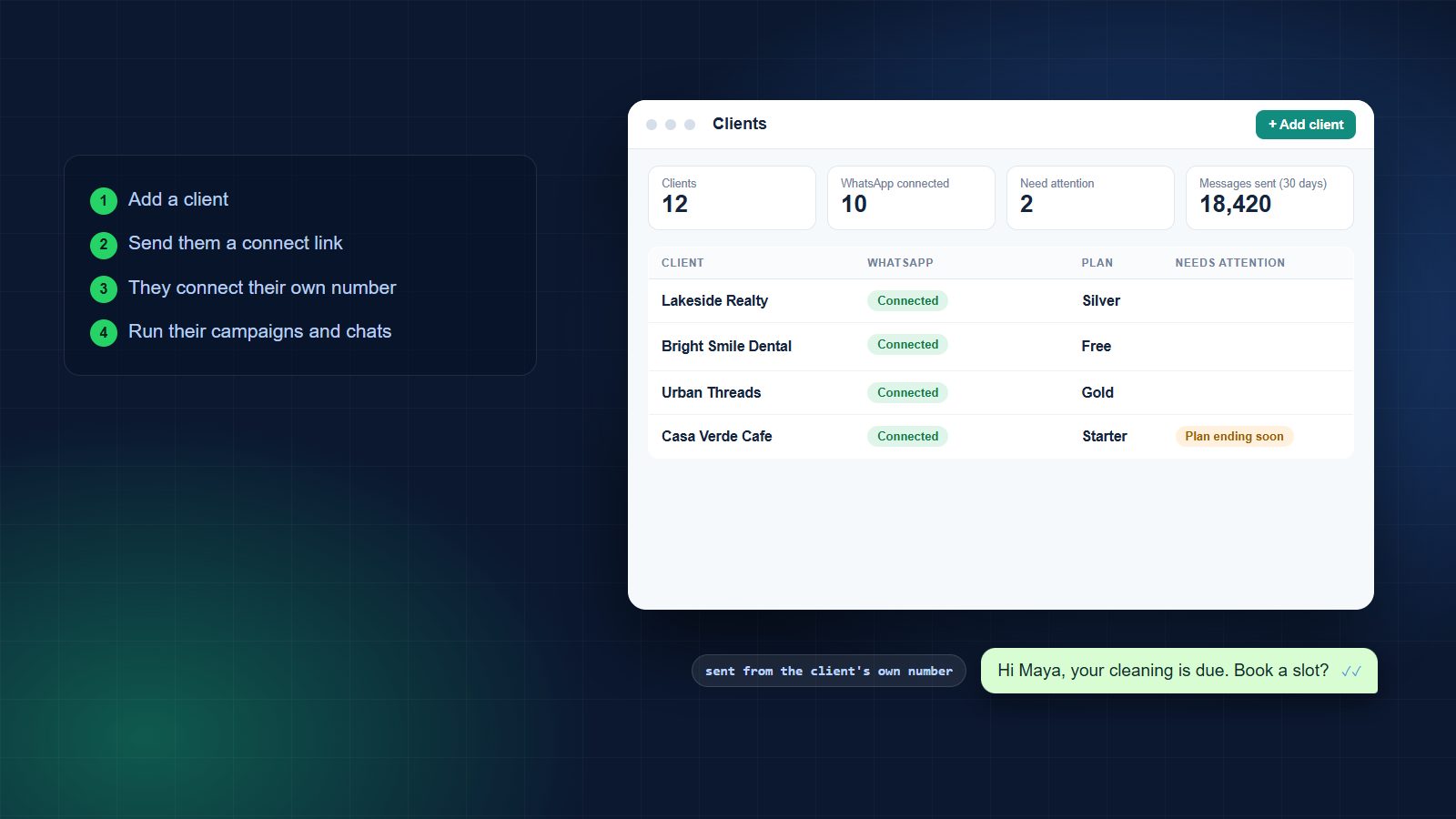
Three steps to your first client
For digital marketing agencies, social media teams, web developers and CRM consultants who run WhatsApp for other businesses.
Add a client
Switch on I manage WhatsApp for my clients, open Clients and add the business: name, type, country and an optional contact.
Send a connect link
The client opens the link, logs in with Facebook and connects their own number. They don’t need a Wabot login or your passwords. They can keep their WhatsApp Business app.
Run their WhatsApp
Open the client’s account to run campaigns, chats, automations and AI bots. Invite their team when they want to answer chats themselves.
The connect link does the hard part
Your client connects their own number through Meta’s signup. You never handle their Facebook password, and you see the result on your Clients page.
From your link to a connected client
What you get
One login for you, a clean separate account for every client.
One Clients page
Every client in one list: WhatsApp status, plan, wallet, messages sent in 30 days and what needs attention.
Connect links
No more asking for logins. Copy the link, send it on WhatsApp or email it. It works for 7 days.
Needs attention
See at a glance who has no number yet, a low number quality, a plan ending or an empty wallet.
Invite their team
Give the client’s staff their own logins as User or Agent, with the permissions you choose.
Plans and payment links
Choose and pay a client’s plan yourself, or send a payment link and let them pay.
Their number, their Meta bill
Each client owns their number and WhatsApp Business Account. Meta bills messages to them directly, with no markup from Wabot.
Your Clients page
Add your first client today
Create your account, add a client and send the connect link.
The old way, and the Wabot way
Most agencies start with shared logins and one phone. It stops working at about the fifth client.
| Shared logins and phones | Wabot for agencies | |
|---|---|---|
| Getting a client connected | Ask for their Facebook login, or sit on a call sharing screens | Send a connect link; they connect it themselves |
| Client data | Mixed in one inbox or one phone | A separate account per client: contacts, chats, templates, plan |
| Knowing who needs help | Check each client one by one | One list with a Needs attention column |
| Who owns the number | Often unclear when a contract ends | Always the client, in their own Meta business |
| Billing | One bill you have to split | A plan and wallet per client; you pay, or they pay by link |
| Your team | Shared passwords | Separate logins, and client staff see only their own account |
What you can sell your clients
Set up once per client, then look after it every month.
Clinics and salons
Appointment confirmations, reminders and review requests for each practice.
Hi Maya, your cleaning is due. Book a slot? ✓✓Real estate
Answer ad leads in minutes and route each enquiry to the right agent.
Thanks for your interest in Lakeside Villas. When can we call? ✓✓E-commerce brands
Order updates, back-in-stock alerts and opted-in offers from the brand’s own number.
Your order has shipped. It arrives on Tuesday. ✓✓Coaching and education
Admissions follow-up, class reminders and fee notices for each institute.
The demo class starts at 6 pm today. See you there! ✓✓Example messages are illustrations. Marketing messages need the customer’s opt-in.
Bill clients your way
Every client account has its own plan and wallet, so you choose who pays.
You pay, and charge your own fee
Use Choose a plan and Top up wallet on the client’s row. Bundle the platform into your retainer at whatever price you set.
The client pays Wabot
Use Send payment link. The client pays the plan price directly, and you invoice your service separately.
In both cases Meta bills WhatsApp message charges to the client’s own Meta account. Plans start at $9 a month per client account. See plans.
Frequently asked questions
How do I turn on agency mode?
On the setup form, tick I manage WhatsApp for my clients. If you already have an account, open your profile, choose Edit Profile, then Account type. It’s free and works on any plan. Only the account owner can switch it on.
Does my client need a Wabot login?
No. They open your connect link, log in with Facebook and connect their number. You can invite their team later if they want to answer chats themselves.
Who owns the WhatsApp number?
Your client. The number sits in their own Meta business and WhatsApp Business Account, and Meta bills message charges to their payment method.
How do I bill my clients?
Each client account has its own plan and wallet. You can pay for a client’s plan yourself and charge them your own fee, or send them a payment link so they pay Wabot directly. A plan bought by payment link covers 30 days and doesn’t renew by itself.
How many clients can I add?
As many as you like. Up to 10 clients can be waiting without a connected number at one time; connected clients aren’t limited.
Can my client keep using the WhatsApp Business app?
Yes. On the connect page they can choose to keep the app on the same number, or use a new number.
Is this white label?
No. Your clients see the Wabot name on the connect page, in Meta’s window and in the app.
What does it cost?
Creating your agency account and adding clients is free. Each client account starts on the Free plan, and paid plans start at $9 a month per account (₹840 a month in India, plus GST). Meta’s message charges are separate and go to the client.
Create your agency account
Sign up, tick I manage WhatsApp for my clients, then open Clients and add your first one.
Create your agency account
Create your free Wabot account, tick I manage WhatsApp for my clients and send your first connect link. No card needed.